HL15 Beast DIY Build – PSU Cable Lengths, PWM Fan Wiring and Used 9305-24i

Hi everyone,

I’m preparing to order an HL15 Beast Chassis & Backplane and will be building it using a similar configuration to the ASUS platform shown in the Beast manual:

  • ASUS ProArt X870E-Creator WiFi
  • AMD Ryzen 9 9950X
  • Noctua NH-D15 G2 LBC
  • DeepCool PX1200G PSU
  • Broadcom/LSI 9305-24i
  • Set A with six SFF-8643 cables

Before ordering, I would appreciate some advice from anyone who has built the ASUS ProArt version or supplied their own PSU.

  1. PSU-to-backplane cable lengths

I’m planning to order custom modular power cables for the DeepCool PX1200G.

The 15-HDD backplane will be powered using two separate PSU cables, with two Molex connectors on each cable.

What overall cable length would you recommend from the PSU to the HDD backplane in the ASUS ProArt layout? Would approximately 60 cm be sufficient?

What cable length would you recommend from the PSU to the 8-SSD backplane?

If anyone has measured the routing distance in an actual Beast build, that would be particularly helpful.

  1. Six Noctua PWM fans

Am I correct that the Chassis & Backplane configuration includes all six Noctua NF-A14 PWM fans?

How are the six fans normally connected to the ASUS ProArt motherboard? Is a PWM splitter or wiring harness included, or should I purchase one separately?

The motherboard has five CHA_FAN headers, so I was considering connecting five fans through a 1-to-5 PWM splitter and the sixth fan directly to another CHA_FAN header.

  1. Noise levels

Noise is an important consideration for me. My 12U rack sits under my desk because I live in a one-bedroom apartment. This is my home lab and very much my pride and joy, so I don’t have the option of moving it into a separate server room.

One of the main reasons I chose the Beast is its six large Noctua fans. I’m hoping it will be considerably quieter than a conventional rack server.

Could any Beast owners comment on the real-world noise level when the server is:

  • Idle
  • Under normal use
  • Performing a ZFS scrub or resilver
  • Fully populated with HDDs

Can you comfortably work beside it, and are the fans or the hard drives the dominant source of noise?

It would also be useful to know what fan speeds or PWM curves owners are using and the resulting HDD temperatures.

  1. Second-hand LSI 9305-24i

I’m considering purchasing a genuine, tested second-hand Broadcom/LSI 9305-24i configured in IT mode.

Is a standard genuine 9305-24i in IT mode all that is required for the Beast, or does the card supplied with the official configuration use any custom firmware or modifications?

Has anyone used a second-hand 9305-24i successfully with both Beast backplanes and the six Set A SFF-8643 cables?

Thanks in advance for any advice, measurements or real-world experience. I’m looking forward to ordering the Beast and starting the build.

Alex
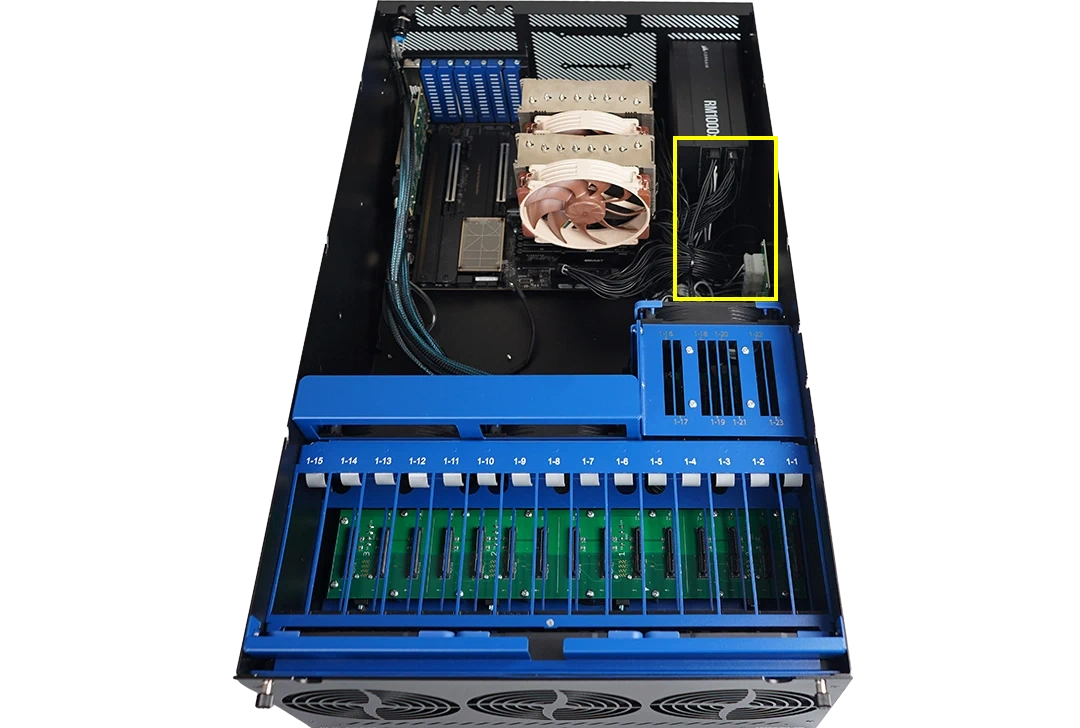
Power cables do not go from the PSU to the backplanes, they go from the PSU to a power distribution board mounted to the side of the chassis. See the bottom right of the highlighted area.


Power then goes from that board to the backplanes. This allows the backplanes to draw power across all connected molex, and also allows for custom low-profile power conectors under the motherboards.

On the non-beast HL-15s there are four molex connectors, and the basic rule given the specs for the wire guage and plastic used in the molex connectors is that a molex connector really shouldn’t power the equivalent of more than four hard drives. I don’t have a beast, and frustratingly have not seen any teardowns, close-ups or build guides, so I’m not sure if the PDB for the beast also has four molex connectors, or actually has more because of the SSD backplane.

The cables 45HL provides for the HL15 to go from PSU to PDB are 20 cm, and I have had custom cables made that length. It looks like that would also be enough for the beast.

What are you doing with the third PATA/SATA output on your PSU? If you are planning to fully load the HDD bays and have a number of SSDs, I’d be concerned about powering that from two PSU outputs, not because the PSU can’t handle it, but because the wiring probably would be out of spec unless your PSU-to-PDB wiring is Y style and not daisy chained on the same cable.

The fans are included in the DIY build configurations. I don’t think they include any PWM fanout cables or hub.

The rack under your desk will accommodate a 27.5 inch deep server? Is it open or closed?

There isn’t any special firmware for the LSI 9305-24i in the full build. It should work fine with Set A.

Thank you, that is extremely helpful and clears up my misunderstanding about the power arrangement. I had assumed the custom cables would run directly from the PSU to the backplanes, but I now understand that they connect from the PSU to the Beast’s power distribution board, with the supplied low profile wiring then running from the PDB to both backplanes.

I’m currently waiting for confirmation about how the SSD backplane is powered. The manual isn’t particularly clear on this, in my opinion, and I don’t want to place the order until I fully understand the complete power arrangement.

My rack comfortably accommodates an HPE DL360, so I expect the Beast should fit, but I’ll double-check the available depth and rear cable clearance before ordering.

Thank you also for confirming that the LSI 9305-24i doesn’t require any special firmware. That means I can confidently source a genuine, tested second-hand card in IT mode and use it with Set A.

Thanks again for taking the time to explain everything.

I’ve also found this Beast build post:

The photographs appear to show a fan splitter and the same four Molex connections. The owner also mentions that the SSD-cage power was initially left disconnected, which suggests that it has a separate connection somewhere in the supplied PDB harness. However, I still cannot clearly determine the complete power arrangement or how many independent PSU-to-PDB cables are required when all 15 HDD and 8 SSD bays are populated.

I’m waiting for clarification from 45HomeLab before ordering the custom PSU cables, as I want to understand the power arrangement fully and avoid ordering the wrong cables.

The post is encouraging regarding noise. The owner also lives in an apartment and reports that the Beast is very quiet with the large Noctua fans, although the top cover developed some resonance from the hard drives. That sounds manageable if it can be resolved with suitable rubber isolation.

2 Likes

You will find that the loudest thing will be the hard drives. The supplied Noctua fans are almost silent unless you’re running them at 100%.

I have 15 Exos drives running in Z3. I could hear them downstairs before I put them in my fully enclosed rack, which reduced the noise a lot.

2 Likes