I just purchased a chasis only HL15 and I noticed a card on the side with four 4-pin molex connectors. The card is called “45Drives HomeLab Power Midplane”. I also see cables connecting to it. Is it necessary to plug this in? What is its purpose? To provide power to the backplanes?
Those are the power connectors for the SATA backplane, and yes they’re required to power the drives.
To expand on @rpungello 's answer:
Without that board you would have to somehow wire and snake molex cables from the PSU to the underside of the HDD backplane. You’d have to remove and reinstall the backplane to connect and change them, and the cables supplied with most PSUs aren’t low profile enough, nor the correct length.
So the chassis comes with the backplane prewired to that PDB, then the builder just needs to provide short cabling from the PSU to the PDB.
There are a few things to note;
- Don’t just run a single SATA-to-4x Molex cable from your PSU to all four connections on the PDB. That would be a fire hazard if you have 15 drives. The basic rule is one cable per four drives to stay safely within the Amperage specs of the 18-guage wire used in most molex cables. The main spike is at boot up, but is still enough to make the wire very hot if you have too many drives drawing current over a single wire.
When you purchase the Chassis-with-PSU, the PSU (Corsair RM1000x) has four separate modular SATA/PATA connectors on the PSU and four custom short cables are run between the PSU and the PDB, connecting one SATA/PATA port to only one of the molex connectors on the PDB.
Power draw from the whole backplane is spread evenly across the connectors on the PDB, it’s not like one molex connector specifically powers drives 1,2,3,4, etc.
You can get away with two separate SATA/Molex wires from the PSU, but the gold standard both for fire safety as well as any POST electrical issues is four.
- The PDB also used to (HL15 v1)–and still has–wires attached for powering the case fans as 2-pin fans. This was a way to power the fans without connecting them directly to the motherboard, also eliminating wiring clutter. You can leave those fan wires out of the PDB unconnected, most people will connect the case fan tails to headers on the motherboard to get 3- or 4-pin fan control. But that was also originally a second goal (though somewhat flawed for HL) of centralizing power distribution.
What PSU do you have?
2 Likes
@DigitalGarden Thanks for the detailed explanation. I would have definitely used on cable to power all 4 slots. I read through the user manual, and I didn’t see anything mentioning this. It would be nice if this was included in the documentation. For the PSU, I got the same one that comes with the Chasis with PSU version. The CORSAIR RM1000x. But 45drives are charging $220 more for the power supply. I found a refurbished one for $114. So I opted for the chasis only.
I think the RM1000x comes with two cables with molex connectors on them. If money is tight, or you are starting with 8 drives or so, you should be fine connecting one of those cables to two of the molex connectors on the PDB and the second cable to the other two connectors. This does leave you with a fair bit of bunched up cable and not a very clean looking build.
When you purchased the HL15 there was an addon option for “Custom Power Cables” for $20. Those are specific to PSUs that use Corsair Type 4 pinning, so they don’t work with all brands of PSU, but most of the Corsair ones including the RM1000x. These are four separate cables that are 8 inches or so long and go from the SATA/PATA port on the PSU to one molex connector on the PDB. You can also build this type of cable with a company like Cablemod, but for more money.
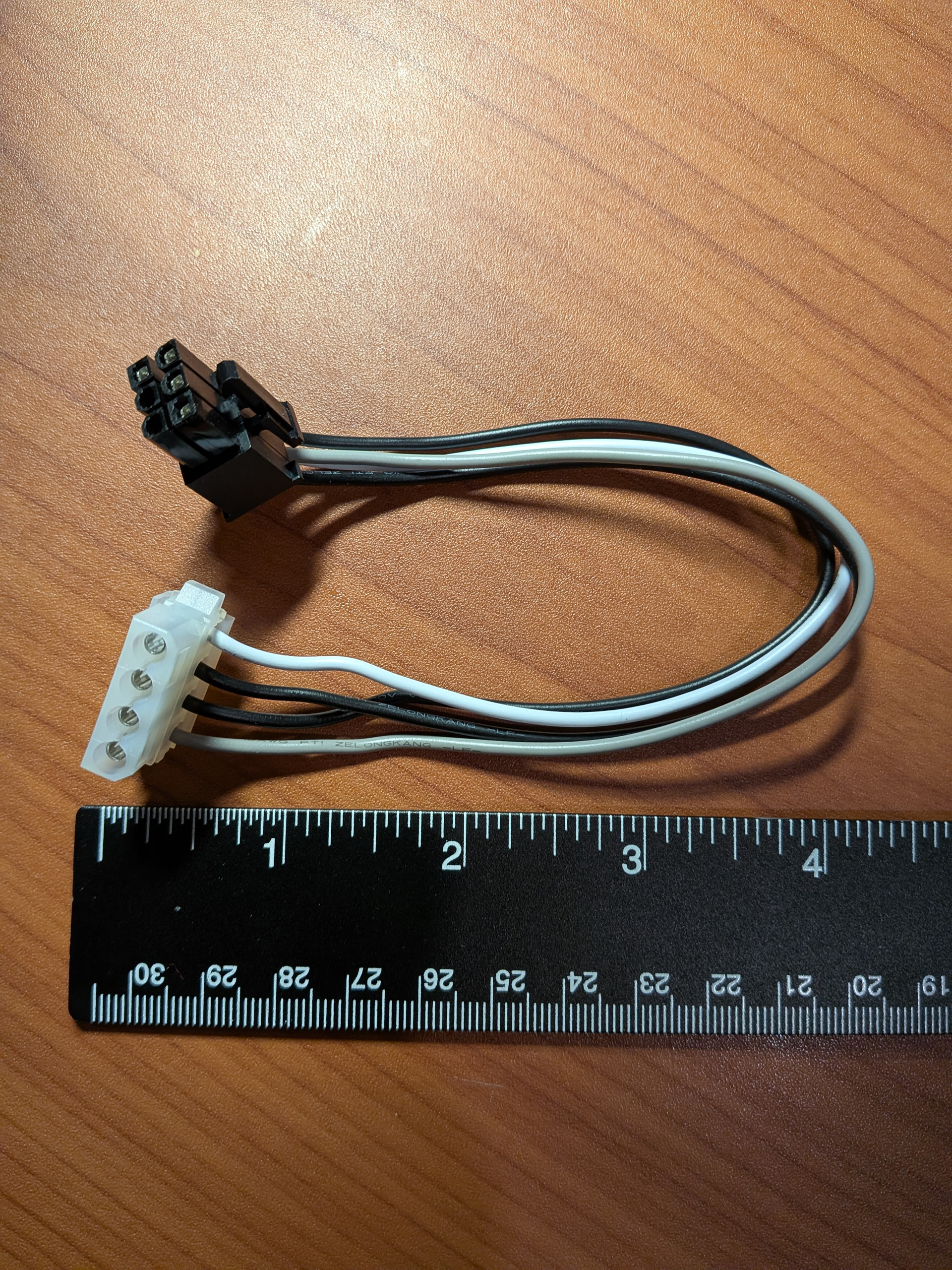
I don’t think 45HL offers the cable set directly on the store as an after-purchase item, but if it were me I’d contact info@45homelab.com and see if I could get a set. Not sure if they’d want to charge shipping above the $20 since it’s not just thrown in the box with the HL15. I get the thing about wanting to save money, especially given how expensive these systems are, but even if you get your system up with the two cables that came with the PSU, for long term stability of your system and data integrity, I’d still keep it in my mind to switch out the two cables for four separate ones in the future at some point.
It’s a bit like the breakers in your home if you’re in the USA; they are rated for 1800W, but no single device that you connect to them is supposed to draw a sustained current of more than 1500W so there is a safety buffer. Of course in the PC we’re talking about lower voltages, but the same principles of electricity apply; pass too much current through a wire for an extended time, the insulation will get hot and shorts can develop etc. It doesn’t matter if that is 12 ga wire or 28 ga wire. Distributing a load over more wires if the wires are available is (I think, but I’m not an EE) almost always better.in low voltage DC electronics.
2 Likes
The User Manual is mainly or exclusively intended for the full build. There is a
separate slightly misnamed brief “HL15 2.0 chassis and backplane / psu - Standard fan wiring instructions” (misnamed because it’s not just the fans):
https://45homelab.com/pdf/Hl15-customer_guide_partial_build.pdf
but beyond mentioning the PDB, it really doesn’t explain that you shouldn’t be running 15 drives off of one PSU PATA port @Vikram-45HomeLab I’d suggest making this a bit clearer in that document and the Noctua-specific one.
1 Like