Truenas - NVMe Mirror - Kioxia CM7R - performance issue

Hello,

I am using Truenas (25.04) in Proxmox with 2 Kioxia CM7-R 15 TB mirrored passed through.

Truenas has 64 GB of RAM and 8 Cores assigned to it.

I ran - zpool iostat

r/truenas - Truenas - NVMe Mirror - Kioxia CM7R - performance issue|750xauto

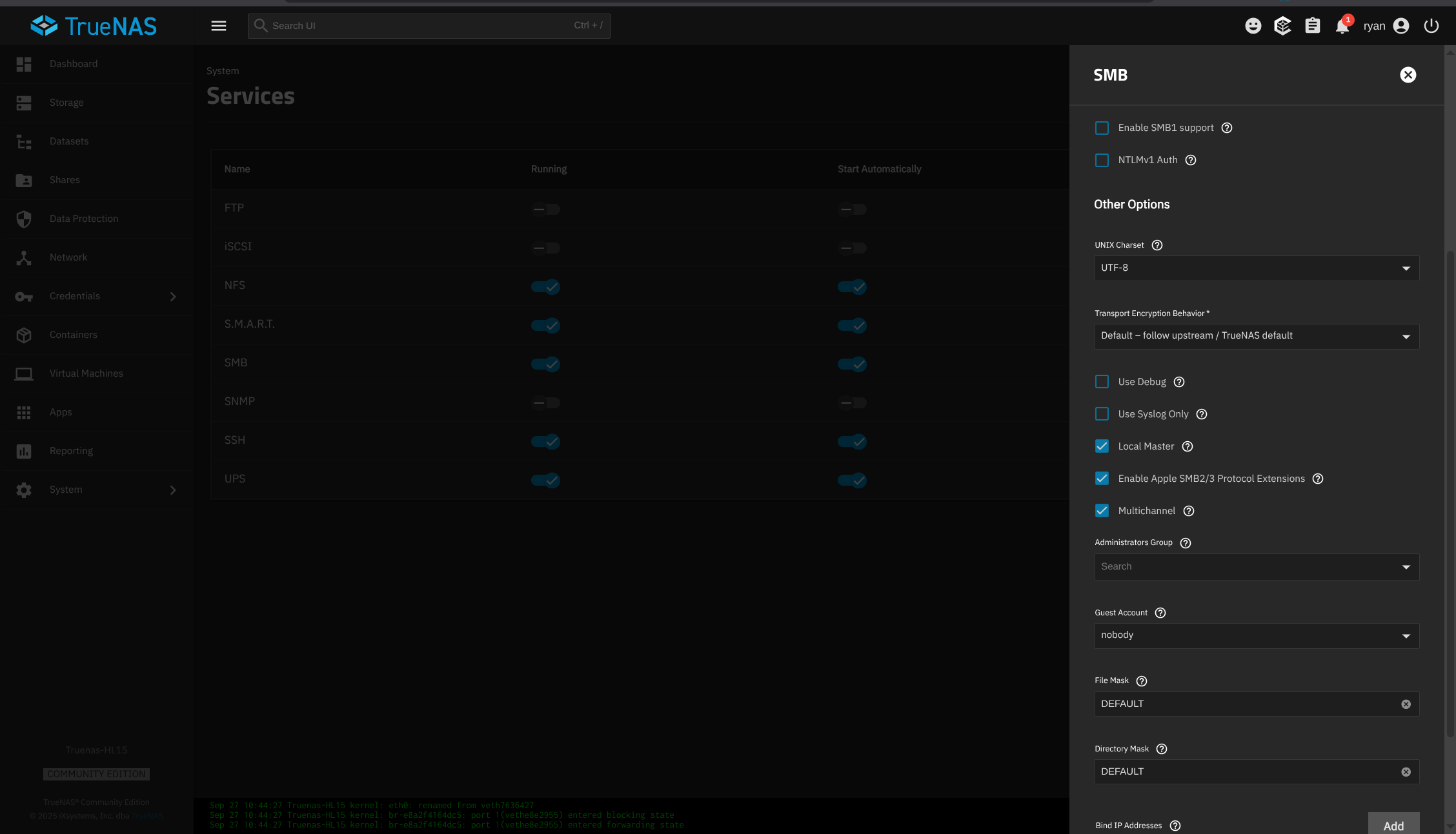
Via SMB, I’m getting at best 190 MB/s over an Intel X710 10 GbE connection (checked the connection speed with iperf it reaches 10 GbE).

I can’t understand what’s not working properly. I had the same setup before, but I had to redo the server and start everything from scratch.

The performance was fine previously—the 10 GbE link was always saturated. I just can’t figure out what’s wrong.

Some “fio” test, the write performance is the problem, I do not know why it is not reaching at least 3/4 GBs.

fio --filename=/mnt/WTank/test --sync=1 --rw=randwrite --bs=1M --numjobs=1 --iodepth=4 --group_reporting --name=test --filesize=10G --runtime=300 && rm /mnt/WTank/test

test: (g=0): rw=randwrite, bs=(R) 1024KiB-1024KiB, (W) 1024KiB-1024KiB, (T) 1024KiB-1024KiB, ioengine=psync, iodepth=4
Run status group 0 (all jobs):

WRITE: bw=640MiB/s (671MB/s), 640MiB/s-640MiB/s (671MB/s-671MB/s), io=10.0GiB (10.7GB), run=15993-15993msec

Run status group 0 (all jobs):

--filename=/mnt/WTank/test --sync=1 --rw=randread --bs=1M --numjobs=1 --iodepth=4 --group_reporting --name=test --filesize=10G --runtime=300 && rm /mnt/WTank/test

test: (g=0): rw=randread, bs=(R) 1024KiB-1024KiB, (W) 1024KiB-1024KiB, (T) 1024KiB-1024KiB, ioengine=psync, iodepth=4

READ: bw=9.99GiB/s (10.7GB/s), 9.99GiB/s-9.99GiB/s (10.7GB/s-10.7GB/s), io=10.0GiB (10.7GB), run=1001-1001msec
Hey @Cpsv - a few questions so I’m not making too many assumptions:

  1. When you say passed through are you passing through a controller to the TrueNAS VM or just the individual drives from Proxmox?
  2. You mentioned starting from scratch. Is this the case for the disk or ZFS pool as well or was that imported? Were you also running TrueNAS 25.04 before the rebuild? Did import your previous TrueNAS config file or did you set it up again from scratch?
  3. What was the other end point of your iperf test? I’m assuming it was from your main computer to the TrueNAS VM.
1 Like

Thank you for the reply.

  1. Each drive was passed through to the TrueNAS VM with full functionality.

  2. The pool & dataset was created entirely from scratch; brand new.

  3. Yes, I’m using the main computer: a MacBook M4 Max (base model) with a 10GbE adapter.

Have you tried running your fio tests with the libaio engine? Do you get the same results? I see a question on GitHub form a number of years ago asking why psync reported low writes in comparisons. Wasn’t answered though. I’m not really familiar with psync. I’m assuming that was an intentional choice?

Also, I’m assuming you’re running fio inside TrueNAS. I think you may also want to use the direct=1 flag on your tests.

1 Like

Thank you for the reply!

I ran the test with direct=1.

sudo fio --filename=/mnt/Titan/Test/test --direct=1 --rw=randwrite --bs=1M --numjobs=1 --iodepth=4 --group_reporting --name=test --filesize=10G --runtime=300 && rm /mnt/Titan/Test/test

Run status group 0 (all jobs):
  WRITE: bw=2509MiB/s (2631MB/s), 2509MiB/s-2509MiB/s (2631MB/s-2631MB/s), io=10.0GiB (10.7GB), run=4081-4081msec

This looks much better, although I was expecting over 3 GB/s.

The question still remains: why are SMB transfers capped at under 200 Mb/s (I tried large files and small files, no matter what I do, it is still less than 200 Mb/s)? How can I debug this?

Great - good to know the drives can achieve higher writes. Does seem like it might be related then to SMB. Double checking - you’re mac and the TrueNAS are on the same subnet right? I assume yes based on your iperf information but wanted to make sure you aren’t routing your storage. If you are, your router is probably a bottleneck in this whole process.

Something you may want to try to try is restarting the SMB service in TrueNAS. I’m pretty sure it was previous to 25.04 but I had an issue where Mac computers had terrible SMB performance. Restarting the SMB service one time fixed it. If I restarted the service again the problem came back. Super strange but it was a thing.

Otherwise, you can turn on debug logs in the service under “Advanced Settings”. This might help us see more what’s going on with SMB. Also, good opportunity to double check the Apple Protocol Extensions is also checked.

2 Likes

Thank you for the reply.

It is already set like this, I am having the same low performance if i access the share from other VMs on the same machine.

Is it possible to be a proxmox networking setting that I need to check?

I’ve been around long enough to know that I’ve seen stranger things. :slightly_smiling_face: The VirtIO driver used in Proxmox does single thread processing network packets on VM’s by default. In the advanced settings of network device, there is an option for Multiqueue which you could try.
Multiqueue

If you are using the VirtIO driver, you can optionally activate the Multiqueue option. This option allows the guest OS to process networking packets using multiple virtual CPUs, providing an increase in the total number of packets transferred.

When using the VirtIO driver with Proxmox VE, each NIC network queue is passed to the host kernel, where the queue will be processed by a kernel thread spawned by the vhost driver. With this option activated, it is possible to pass multiple network queues to the host kernel for each NIC.

When using Multiqueue, it is recommended to set it to a value equal to the number of vCPUs of your guest. Remember that the number of vCPUs is the number of sockets times the number of cores configured for the VM. You also need to set the number of multi-purpose channels on each VirtIO NIC in the VM with this ethtool command:

ethtool -L ens1 combined X

Have you monitored CPU performance while transferring? I believe you should see a single core maxed out if this was the bottleneck.

1 Like

Maybe try turning on NFS shares and see what the performance is. That could help you rule out proxmox networking. I’m pretty sure MacOS still has NFS support but any Linux VM would do.

1 Like

Thank you very much for the reply.

Did it and still the same performance, both for FIO and for SMB.

Tried this, and also tried with other Linux VM’s, still same performance.

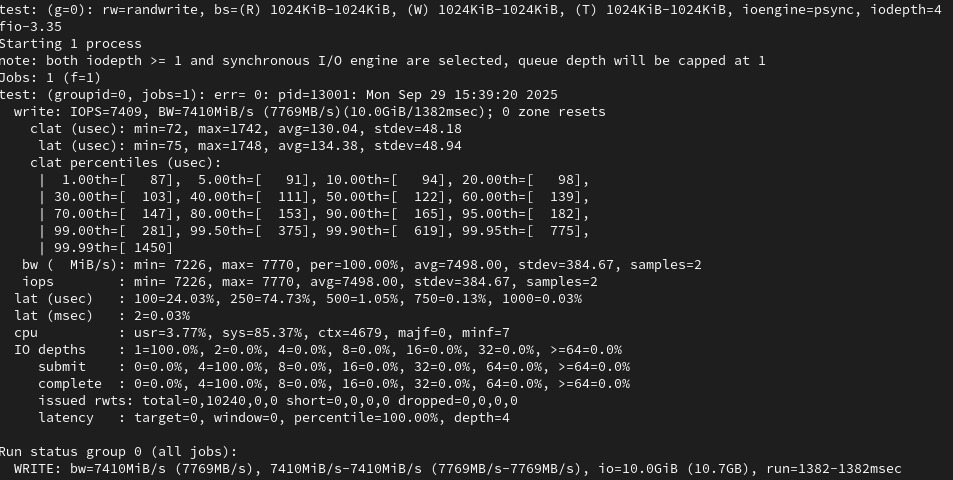
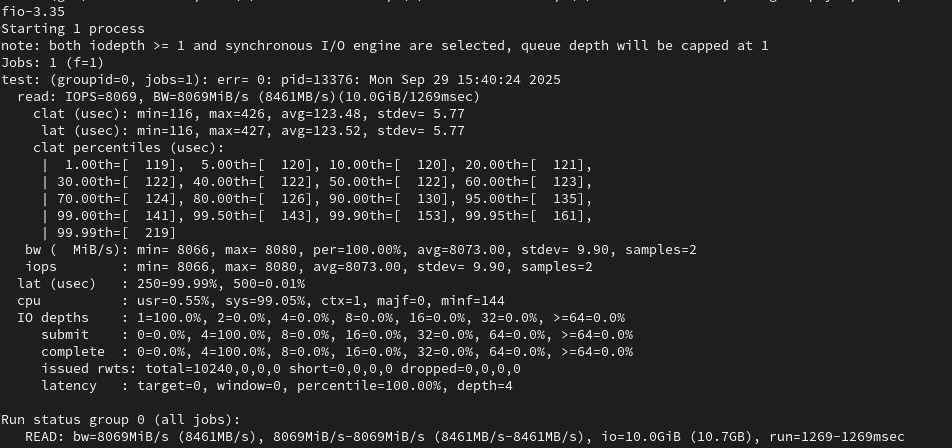
I imported the zpool into a Rocky 9 nativ, no VM, and the pool performance is much higher.

Write

Read

I just destroyed the zpool on the nativ Rocky 9 machine, and teste each driver independently.

Both drives reach the performance stated in the spec, ~14 Gb/s R, ~7 GB/s Write, therefore the drives are fine.

FIO test for each drives is similar to the performance stated in the spec, (FIO command: sudo fio --filename=/mnt/Titan/Test/test --direct=1 --rw=randwrite --bs=1M --numjobs=1 --iodepth=4 --group_reporting --name=test --filesize=40G --runtime=300 && rm /mnt/Titan/Test/tes), except for the read which is ~10/11 GB/s.

I concur - these tests pretty much rule out the drives themselves. It’d be nice if you could put these drives into a bare metal TrueNAS instance to see how it performs. That would help eliminate the variables from Proxmox virtualization. If I had to guess right now, Proxmox and virtualizing TrueNAS would be where I think the problem lies.

1 Like