So I bought my HL15 2.0 with the EPYC 7252 CPU in it and I recently bought a EPYC 7282 to swap it with for a little extra power. I was wondering since I have never done this before on a linux machine do I need to do anything after I swap CPU’s or after I swap I can just run an check for updates and I should be all good. I am just nervous that there might be some conflict of drivers or something and my system is running very smoothly I do not want to mess it up.
I’ve only ever swapped cpus in Window machines so I just wanted to double check it should be about the same with no extra steps.
Swapping a CPU on Linux should be easier than on Windows in most cases. You don’t have to worry about the swap triggering some sort of licensing fingerprint change detection. The CPU drivers are built into the kernel and for the vintage we’re talking about are solid and stable. From the kernel perspective in this case you’re just adding cores. After the swap you can use lscpu to verify the OS sees the new CPU as expected, but there are no commands or updates you are required to run.
3 Likes
Okay thanks that makes me feel better about doing it. I just now hope the “unlocked CPU” I bought will actually be unlocked haha. Now to schedule a day to shut everything down and swap it.
I’ve done CPU swaps on linux before without any problem. In fact, I’ve taken just the hard drive with Linux installed and put it into an entirely new machine without problem. Linux really doesn’t care as long as it knows how to interface with the hardware.
I’ve done this exact CPU swap on my HL15. Its nice to have some extra cores for apps (Jellyfin, PBS, Syncthing). From past CPU swap experiences, make sure you clean the heatsink and cpu top (isopropyl and clean cloth) , apply heatsink compound evenly over entire surface.
3 Likes
Long overdue but I finally did it and swapped my CPU, it went as everyone said, smoothly (thank goodness it wasn’t locked or I’d be in trouble). But now my server has a new CPU in it and I also threw in an Intel Arc A310 Eco in it also!
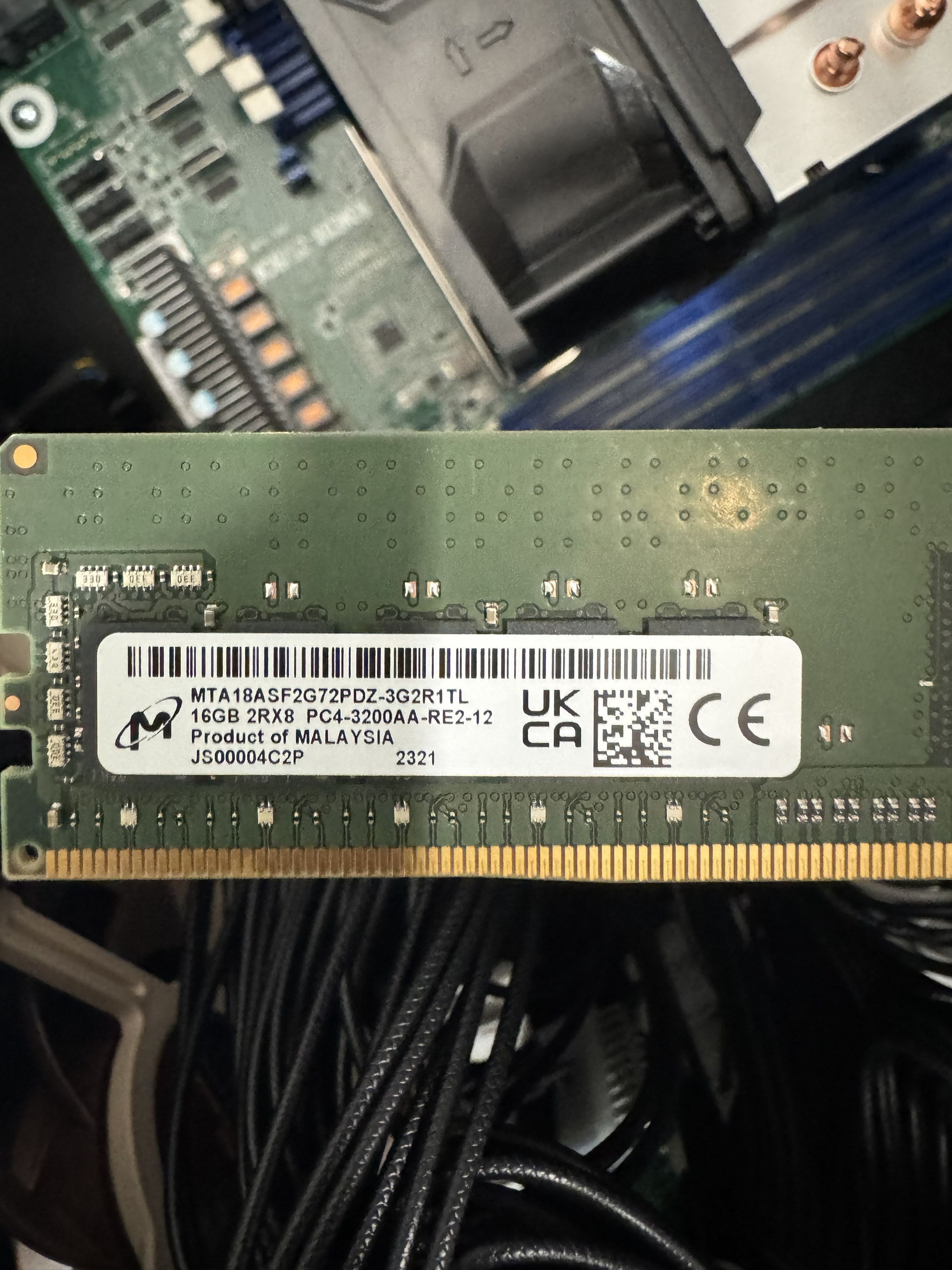
Now the last thing is to try to find another 32gb kit of RAM to add to my RAM that is in it. What currently in mine is 2 Micron 16GB 2RX8 PC4-3200AA-RE2-12. So if I just buy another 3200 kit I should be okay or should I just buy a whole 64GB kit of 4 new DIMMS ?
2 Likes
You don’t need a full matched 4x 16GB set, or another 2x 16GB of that same make/model, you can just buy two more 16GB sticks from any vendor, but you need to be sure they are buffered ECC and preferably the same rank. So;
DDR4, RDIMM (Registered), ECC (must)
3200 MT/s (preferred, slower will mean all RAM will run slower)
2Rx8 (preferred, 1Rx8 will work, but may have stability issues depending on workload)
That’s a relief.
The only thing is the memory I have installed doesn’t say ECC on it but I assume it is? I added a picture of what is currently in it, there is no other stickers on it.
1 Like
Ah okay thanks for the info I appreciate it!