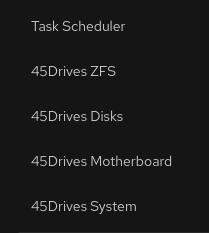
While I don’t have the HL15 Beast, I was able to install Rocky 9.6 fresh from the DVD-ISO image and add all the 45 Drives packages including their updates for NFS and SMB.
from what I posted on an earlier thread Hutch confirmed that most items should be ok on the initial install.
While I don’t think having a package list is going to help, what are all the cockpit packages?
do you see any of the 45Drives left side navigation? image attached
Here is the list of packages I made sure that were installed –
@45drives_enterprise are items directly from 45 Drives.
dnf list --installed | grep cockpit
cockpit.x86_64 344-1.el9
@baseos
cockpit-45drives-hardware.x86_64 2.5.8-1.el9
@45drives_enterprise
cockpit-benchmark.noarch 2.1.2-1.el9
@45drives_enterprise
cockpit-bridge.noarch 344-1.el9
@baseos
cockpit-composer.noarch 53.1-1.el9_6.rocky.0.1
@appstream
cockpit-doc.noarch 329.1.2-1.el9
@45drives_enterprise
cockpit-file-sharing.noarch 4.3.2-2.el9
@45drives_enterprise
cockpit-files.noarch 24-1.el9
@appstream
cockpit-identities.noarch 0.1.12-3.el9
@45drives_enterprise
cockpit-machines.noarch 337-1.el9
@appstream
cockpit-navigator.x86_64 0.5.12-1.el9
@45drives_enterprise
cockpit-ostree.noarch 1:213-1.el9
@appstream
cockpit-packagekit.noarch 344-1.el9
@appstream
cockpit-podman.noarch 111-1.el9
@appstream
cockpit-scheduler.noarch 1.4.1-1.el9
@45drives_enterprise
cockpit-session-recording.noarch 20-1.el9
@appstream
cockpit-storaged.noarch 344-1.el9
@appstream
cockpit-super-simple-setup.noarch 1.1.3-2.el9
@45drives_enterprise
cockpit-system.noarch 344-1.el9
@baseos
cockpit-tests.x86_64 329.1.2-1.el9
@45drives_enterprise
cockpit-ws.x86_64 329.1.2-1.el9
@45drives_enterprise
cockpit-zfs.noarch 1.2.12-2.el9
@45drives_enterprise
and the extra packages from 45Drives
dnf list --installed | grep @45drives_e
45drives-tools.x86_64 4.0.30-1.el9 @45drives_enterprise
cockpit-45drives-hardware.x86_64 2.5.8-1.el9 @45drives_enterprise
cockpit-benchmark.noarch 2.1.2-1.el9 @45drives_enterprise
cockpit-doc.noarch 329.1.2-1.el9 @45drives_enterprise
cockpit-file-sharing.noarch 4.3.2-2.el9 @45drives_enterprise
cockpit-identities.noarch 0.1.12-3.el9 @45drives_enterprise
cockpit-navigator.x86_64 0.5.12-1.el9 @45drives_enterprise
cockpit-scheduler.noarch 1.4.1-1.el9 @45drives_enterprise
cockpit-super-simple-setup.noarch 1.1.3-2.el9 @45drives_enterprise
cockpit-tests.x86_64 329.1.2-1.el9 @45drives_enterprise
cockpit-ws.x86_64 329.1.2-1.el9 @45drives_enterprise
cockpit-zfs.noarch 1.2.12-2.el9 @45drives_enterprise
libnvpair3.x86_64 2.2.9-2.el9 @45drives_enterprise
libuutil3.x86_64 2.2.9-2.el9 @45drives_enterprise
libzfs5.x86_64 2.2.9-2.el9 @45drives_enterprise
libzpool5.x86_64 2.2.9-2.el9 @45drives_enterprise
python3-libzfs.x86_64 2.2.1-6.el9 @45drives_enterprise
rclone.x86_64 1.69.1-1 @45drives_enterprise
zfs.x86_64 2.2.9-2.el9 @45drives_enterprise
zfs-dkms.noarch 2.2.9-2.el9 @45drives_enterprise
hope that helps