The HL15 2.0 looks pretty stout. Only thing it seams lacking is a redundant PSU. I found “FSP Twins Pro 900w”. Is this PSU compatible with the HL15 or is there a conversion harness needed to power the backplate. TIA
Wendell/Level1Techs has a video where he says it should work, but I’m not sure he actually did that build. There aren’t any special brackets needed, it’ll screw in as a normal ATX PSU. But, the two questions I wold have would be;
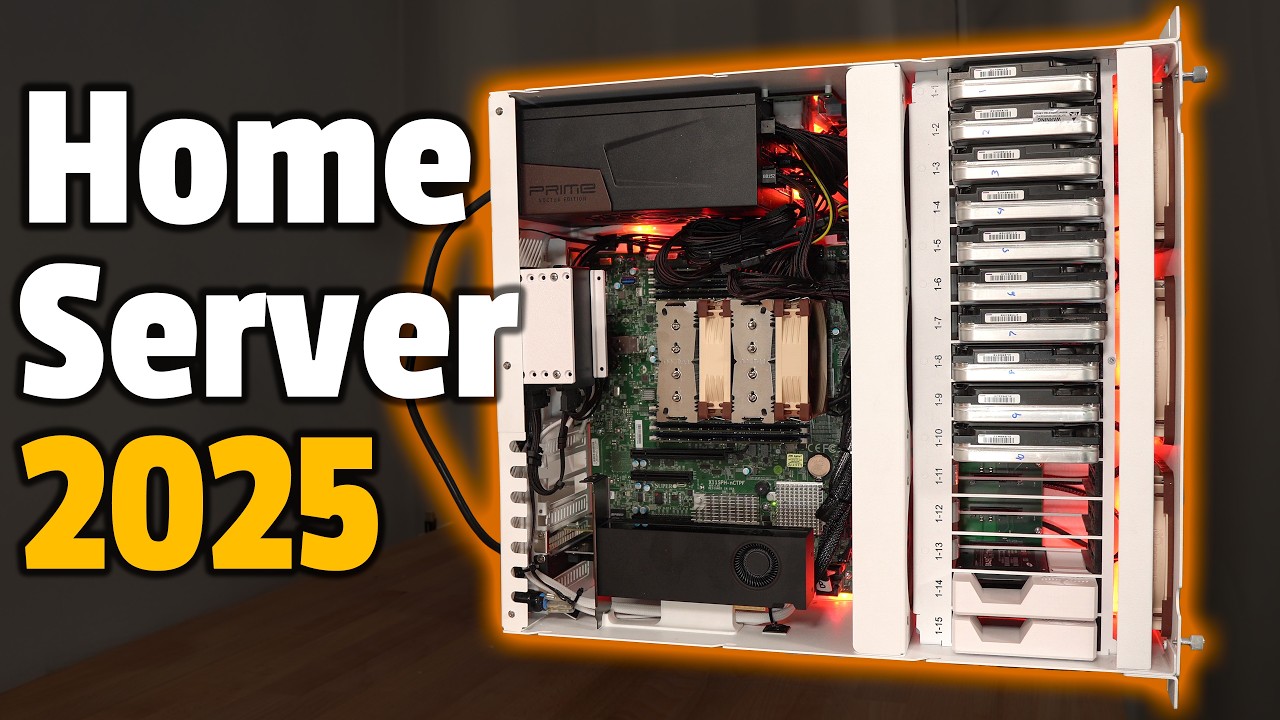
- Length. The PSU is stated to be 190mm. The chassis has a power distribution board at 200 mm, It’s possible that the cabling and plugs of the PSU and PDB will interfere with each other. The modular version might be better here than the captive bundle of wires version.
- PATA Connections. Based on what I could find, the PSU has one cable from the PSU with two 4-pin molex daisy chained on it. You are effectively running all your drives over one 12V cable. If you have more than about eight drives, that’s probably out of spec for the amount of amps the wiring guage used is supposed to carry. I don’t know what wire guage they use, but those connectors are intended to power one peripheral, not 15. An ideal/full build setup is to have four separate molex from the PSU to the PDB, giving about 4 drives per connection. That’s the “engineering design margin” typically built into electrical systems. That can be pushed a bit since the peak load only occurs briefly at startup, and you probably aren’t running the most power hungry enterprise drives, but I think the minimum recommended would be two separately wired molex connections from the PSU to the PDB.
Wendell’s a smart guy, so my concerns might be unfounded, but that’s what I would want clarification on if I wasn’t able to return the product.
1 Like
Could you post the video link for me please.
Here is a video about the PSU:

At 2:17 in the following one is where he says it would work in the HL15:

But the B roll is from the prior video, and the actual build he does in the second does not use a redundant PSU.
Level1 has a forum and you could also ask there, but I get the impression they are a bit snobby.
I don’t recall anyone else here mentioning installing a redundant PSU, and those are certainly an option on 45Drives enterprise hosts, although perhaps not the ATX PS2 form factor. Maybe another forum member or 45HL official will chime in.
1 Like
Needed yes, since the cables from the Corsair PSU to the 4 molex connectors on the power distribution board for the backplane can’t be used in other PSUs as they’re not universally compatible.
Take a look on Techno Tim on youtube to see what’s wrong and how to kind of fix it. Don’t know if this is good enough.
2 Likes
It’s good to understand that modular PSU cables are manufacturer specific, I read OP as considering a new chassis-only purchase, not upgrading the PSU in an existing build, but perhaps I’m wrong, If he doesn’t have an existing Corsair PSU he won’t have existing Corsair pinout cables. TT doesn’t need a “jenky adapter setup” he just needs to order four custom cables off of cablemod.com.
What that video does illustrate is the PDB and the working area next to the PSU. His Seasonic TX-1600 is nominally 210mm, so longer than the FSP Twins. He did get it to work, but you can see how tight the working area is for the PSU to PDB cabling.
2 Likes
Ah, my bad. I guess there might be a way to split the current load out from that FSP Twins Pro with custom cables if it has enough ports to safely supply the 12v amps needed to spin up 15 drives (probably just shy of 40 Amps).
If the PSU is in conflict with the PDB, I would consider just moving the PDB if at all possible.
Another thing to mention might be the need for a PSU that can provide power to PCIe 5, if you’re going to install GFX cards. I know nothing about this as I’m not using any GFX cards myself. Just something I saw mentioned.
May I ask which 4 cables from cablemod? I couldn’t find any 6 pins cables for 5v, 12v and gnd? The configurator and store only had PCIe 6 pin cables and those only provide 12v and no 5v? I was considering switching to the Seasonic Prime TX 1300.
1 Like
In the Configurator,
- Select Custom PSU Cables, Next
- Select your PSU brand and model, Next
- Select your sleeving, Next
- Select classic or pro, Next
- Selext a single, dual, triple or quad molex connector to add, Next. The molex cables are at the bottom of the dropdown. Ideally if you have four SATA/PATA ports available on the PSU you’d want four cables, although you could probably be fine with two duals.
- Repeat to add wahatever cable(s) you need, Next. After you add a cable you can adjust it’s length with the slider. With a 210mm PSU, the minimum 150mm cable length is probably fine. IIRC the ones 45HL provides, and the ones I have ordered, are 200mm, but I have the shorter Corsair PSUs.
- Select your colors, Next.
- Select any additional upsells and click to add the cable kit you created to your shopping cart.
Then go through the checkout process. It’s not cheap, but nothing in the modern world seems to be. If you need to be cheap, you could pair the single 3 connector molex that is apparantly included with the TX-1300 with just a single cablemod molex, so you have the power going over two separate cables, and probably be fine, not knowing your build specifics. If it were me, though, I’d pay a bit to not have a rats nest of cables around the PSU, especially an area already crowded by a long-ish PSU.
And, yes, moving the PDB is probably do-able. I wasn’t implying there weren’t solutions, I was just pointing out the two things I’d think about regarding what I saw about the FSP unit.
2 Likes
Thanks for the detailed walkthrough!
I was close, I missed the molex options in the bottom of that list as I was looking for 6 pin connectors on the PSU side.
I prefer to do it right than be cheap about it and as you said it’s a rats nest there.
I didn’t mean to imply that you meant anything else either, and I completely agree with you. My wording might be lost in translation, not a native speaker.