This morning, one of my five 24TB drives in my HL-15 (version 1) running TrueNAS CE went offline without much information. I hadn’t seen any issue in the smart data, and now, when I look, I don’t even see smart tests for that drive, but I do for the others. Perhaps it is hiding the smart data since it is no longer online? I tried setting the drive back to online, but while it doesn’t give an error, it doesn’t do anything.
I shut down the system and powered it back up, hoping it was a glitch, but the issue persisted.
I checked the wiring on the motherboard, and both connectors seemed installed snugly. I couldn’t see the connectors on the other end.
I have SDA→SDE, where SDC is the one missing. I thought of re-seating the drive. Does SDC mean it should be the one in the 3rd slot on the chassis? (I used the first 5 from right to left.) If that doesn’t work, perhaps I can reseat it in another slot on the backplane, in case it is a backplane issue. To pull the drives, there is no locking mechanism, I’m assuming…just grab the drive and give it a soft pull to remove it?
At some point, I planned to buy a few more drives, but wasn’t expecting to have to do it this soon. =/
Here are some of the notes from the shell and storage tab for additional information…
In the storage tab, SDC shows the serial # instead of SDC, and the status is “REMOVED”, and ZFS Errors says “No errors”.
zpool status -v reports status as degraded and notes that “one or more devices have been removed by the administrator. Sufficient replicas exist for the pool to continue functioning in a degraded state.
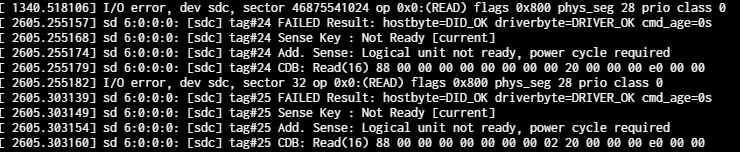
smartctl -a /dev/SDC said it wasn’t in the smart database but has SMART capability and had several issues, saying “scsi error device not ready”.
The surest way to identify the correct physical drive is to match the serial number shown on the Storage tab for sdc to the drive stickers. To remove a drive you just pull up on it, there is no locking mechanism. You can try a different slot.
Not sure what RAID type you are running, but the longer you run in a degraded state the more at risk you are of a second drive failure taking out the pool. Replacing the drive may be more important than figuring out what happened to the current one, if what happened isn’t obvious.
I think best practice is to keep at least one appropriately sized spare on the shelf.
You can try;
dmesg | grep -i sdc
and see if that gives you any info about the failed drive.
UPDATE: Moved the faulty drive to another slot, but the drive still can’t be brought online. So it is looking a lot like the drive just went bad (Seagate EXOS 24TB, about 6 months old). I’m planning on just buying a replacement, and once I get the replacement installed, sending the bad drive in for warranty replacement, so I’ll have a spare.