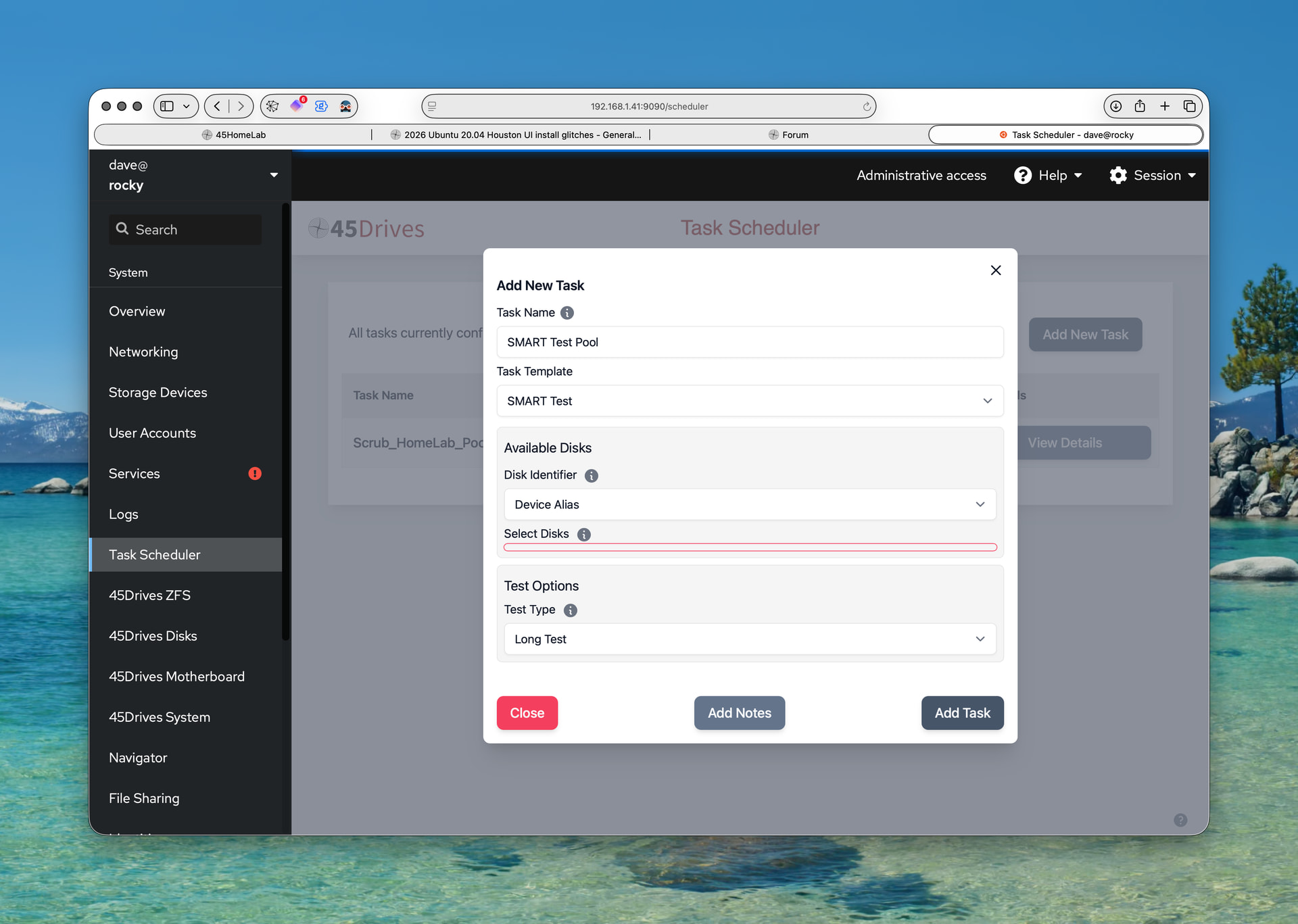
I’m unable to create SMART tests for the members of my pool. I can select the device identifier type but there is no drop-down for the available choices and no text box to type in sad, sob, … device nicknames.
Here’s what the window looks like after trying to conjure up an entry widget of some sort and clicking Add Task button. What looks like an empty text field is outlined but I can’t get the focus in there.
No urgency to fix but does need gripped for eventual repair.
Thanks
Hey @DismalWizard Could you provide the exact version of the task scheduler you currently have installed?
Is it the latest version released on our repo?
Is your ZFS pool created with alias drives or drive identifiers like sdb, ade, etc?
Can you open the console logs in your browser to see if there is any log of what the issue might be?
any aditional info you provide can help me and the RnD team work on resolving this
22.04 is happy. A FIX button looked up the wanted identifiers and put therm where needed.
Happy now. Issues with colors and contrast. Even with Tleilaxu eyes, and reading glasses, there are readability issues on M1 iMac Retina display (5K) and Safari. Lots of day/night switching needed to get things visible. FIX buttons were one of those things in Houston dialogs that were not identified the first time around. But they’re quite helpful. Well done there.