Hey guys, trying to upgrade my HL15. Any help is appreciated! Thank you
Issue:
When I try to plug in the p40 graphics card to the power supply, the system will not turn on. Fans click as if they’re about to start, but never do. When the p40 is not plugged in, system boots up fine.
Here’s what Im adding to the HL15
RAM:
SK HYNIX 128GB ECC DDR4 RAM (4x32GB) 2Rx4 PC4-2400T-RB1-11 (HMA84GR7MFR4N-UH)
GRAPHICS CARD:
NVIDIA Tesla P40 24GB GDDR5 PCI-E 3.0 x16 GPU Accelerator Graphics Card
Here are the Specs of my HL15:
HL15 - Fully Built & Burned,
Motherboard - X11SPH-nCTF
Processor - Xeon Silver 4210
Memory – 32GB
AC Power Cord – Type B (North America)
Addons – Rails
Addons – Pre-configuration service
hard disk – Toshiba 4TB X 8Units
Also, I want to point out im using these cables for the p40 since it didn’t come with cables (2 different types because I thought it may have been a cable issue?
-CableMod C-Series Pro ModFlex Sleeved 8-pin PCI-e Cable for Corsair Type 4 RM Black Label/RMi/RMX (Black, 60cm)
-Thsion Individually 8-pin (6+2 Split) PCIe Cables (Single Connector) Type 4 Gen 4 Compatibility for Corsair PSUs – Black
My understanding (I don’t have one) is that the P40, being a data center GPU, not a consumer GPU, requires EPS power, not PCIe Power. So you’re tripping short protection when you use the PCIe cables. You need an adapter cable to power that from a consumer PSU. Specifically, a Dual 8-pin PCIe Female to 8-pin EPS Male adapter (eg, Nvidia part number 030-0571-000, but I’m sure there are generics).
The P40 draws up to 250W, have you upgraded the PSU from the RM750e? You probably should if you’re going to load up the backplane. What are you doing for cooling the P40?
2 Likes
Thanks for the response!
Im still using the RM750e
For cooling, I still have the original fans connected, but they’re sitting on top of the unit since the p40 didnt allow space for the p40 and the fans to sit in the same location
Just so I understand, if I purchase this unit, then I should be able to have the p40 fully capable with the HL15 unit?
If you purchase that adapter it should address your power issue, but as far as the P40 being “fully capable” in your HL15 the way you have described your setup I have my doubts.
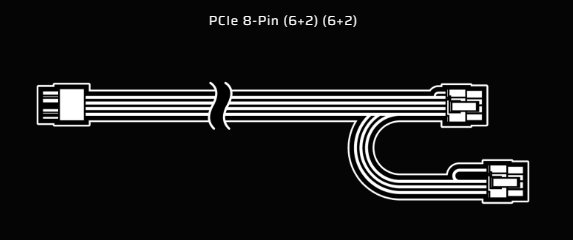
For the adapter, you should have gotten a cable like this with the HL15;
Normally PCIe cables are only rated for 150W and the P40 can draw 240W, but that particular cable is intended for 300W GPUs, so you can plug the two ends of it into the PCIe side of the adapter and the CPU side of the adapter into the P40. If you don’t have that cable, you should use two separate PCIe cables from the RM750e to each of the PCIe connectors on the adapter.
Do you understand how those GPUs are installed in data centers, though, since they don’t have active cooling fans on them? They are in cases with high speed, high static pressure fans and airflow guides that force a lot of air through the heatsink fins to cool the card. You should read an article like this to understand what you need to do in a homelab to cool the card if you don’t have a GPU server chassis;
Cooling a Tesla P40 in the living room
Without proper cooling at best the card will thermal throttle then thermal trip when it gets too hot. At worst if you let it thermal throttle or trip repetitively, it will slowly cook the silicon.
Finally, I don’t know what all else is in your build, but the RM750e in the HL15 wasn’t intended as a PSU to be used with high power GPUs. It was sort-of the minimum to run a system with 15 drives and a few cards like a NIC or HBA that get their power from the PCIe slot. It’s probably sufficient to get you started, but remember PSUs like the RM750e are most efficient at about 60% load; they aren’t intended to be run at 750W continuously. After getting things working, I would suggest looking for a 1000W PSU for more headroom.
1 Like