Question on the 6 ssd bracket. Would that give it a total capacity of 14 ssd? How have people connected the additional ssds to the board? Interested in solutions that use nvme drives even if the pci lanes are bifurcated.
The SSD Bracket gives you the ability to mount the SSD’s but you still need something else for data. This will probably be different based on the version of the HL15 Beast you pick - Asrock vs Asus ProArt.
With either build, you could buy a second LSI HBA card. 45HomeLab recently started selling the LSI 9400-16i on their website. In my opinion, it’s a good price for the HBA - especially knowing it’s authentic. Unfortunately, eBay is full of cheap knock offs.
With the Asrock build, you might be able to use the OCuLink ports for the additional SSD’s. I was able to do this with the ASRock Rack X570D4I-2T motherboard. The BIOS had a built in option for SATA over OCuLink so I only had to buy a break out cable. I don’t know for sure this feature is included with the ROMED8-2T motherboard. Hopefully, I will soon as I’m in the process of giving my HL15 v1.0 the 2.0 treatment.
You also mentioned NVME drives. OCuLink is again an option certain nvme drives like U.2 or you can go with the M.2 carrier card in a PCIe slot. 45HomeLab recently started offering the Startech DUAL-M2-PCIE-CARD-B option on their website. There’s a quad version of this card too you can get on Amazon or Ebay if you look for QUAD-M2-PCIE-CARD-B.
1 Like
Great info. I haven’t looked at the pro art board because I prefer something with ipmi. I suppose I could use a jetkvm/ etc.
If you’re looking to expand like this then I would think the ASRock setup would be the way to go for greater flexibility.
I don’t think the Beast backplate has the holes for mounting the official 6 SSD bracket. I think that bracket is specifically for the HL15 “Least”. But, obviously there’s enough room in The Beast to 3D print and install some other bracket. The SSD cage and bracket are not for 15mm NVMe SSDs though, just consumer SATA 7mm ones. There is a 3D print for holding a few 15mm drives floating around, but it is a riff on the 6 ssd bracket so also intended for screwing to the HL15 “Least” backplate.
If you want NVMe in the m.2 not the EDSFF/U.2/U.3 form factor, I’d look at the 4x carrier cards if you are using an Epyc server motherboard.
1 Like
I thought the holes I highlighted below were for the SSD mount. Is that not the case? (Apologies for the pun.) I’m going off the images on the website.
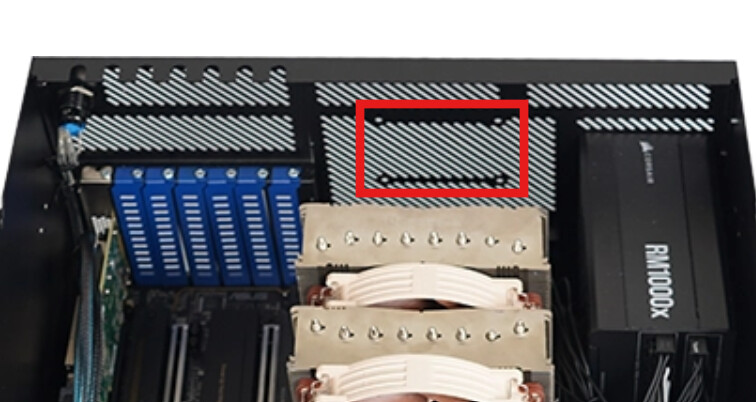
Regardless, space between the CPU fan and the back of the case might be a problem as well for six SSD’s. 
3 Likes
I stand corrected. Thanks.
1 Like
I’m using all M.2 SSD’s and have them in two of these carrier boards.
I picked them because the entire top of the board is a heat sync and the fan exhausts out the back. Plus, as a bonus, there is a status led for each NVME on the back panel.
I currently have 8xnvme ssd’s installed this way and running fine
2 Likes