HL-8 LSI 9400-8i with mix of SAS + SATA Write Performance

Hi 45Home-Labbers:

I finally got my HL-8 UnRAID setup with (8) Seagate Exos Enterprise HDDS and 2x 2TB NVMe Cache Drives. All drives passed the disk scans and parity was completed.

I have a mix of (2) 16TiB SAS, same brand, Seagate Exos and (6) 16TiB SATA drives connected to an HBA from Broadcom - LSI 9400-8i x8 lane PCI Express 3.1 SAS Tri-Mode Storage Adapter.
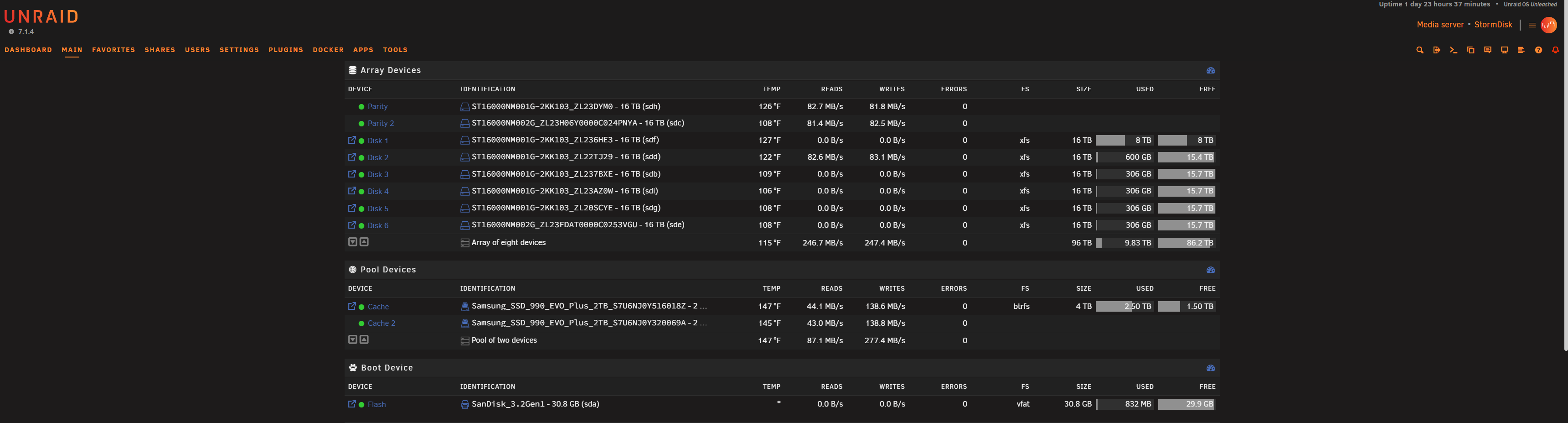
As you can see from the screen cap, I’m only getting 75-80 MB/s write performance even on the SAS drives; The ST16000NM002G_ZL23FDAT (sde) + ST16000NM002G_ZL23H06Y (sdc) are the SAS HDDs.

I thought it was the HBA and looked around the guy at ‘Art of the Server’ had a video post about updating the really old FW and BIOs. So, I did that too only via the Windows StorCLI64.exe.

QQ: Shouldn’t the write performance be better on the SAS HDDs? What kind of write performance are SAS-only users seeing in UnRAID?

_________________

StorCLI or StorCLI64.exe (Windows)

If you come upon this post, here’s the PRO tip, put the ‘Storcli64.exe’ in the root of your C:\ drive with the 3 BIOs you want to update.

Broadcom LSI 9400-8i FW Files:
mpt35sas_legacy.rom
mpt35sas_x64.rom
HBA_9400-8i_Mixed_Profile.bin

c:/storcli/storcli64 /c0 download file=HBA_9400-8i_Mixed_Profile.bin
Downloading image.Please wait…

CLI Version = 007.3503.0000.0000 Aug 05, 2025
Operating system = Windows 11
Controller = 0
Status = Success
Description = CRITICAL! Flash successful. Please power cycle the system for the changes to take effect
____________________________________________________________________

c:/storcli/storcli64 /c0 download bios file=mpt35sas_legacy.rom

Downloading image. Please wait…

CLI Version = 007.3503.0000.0000 Aug 05, 2025
Operating system = Windows 11
Controller = 0
Status = Success
Description = Bios Flash Successful
_______________________________________________________________________

c:/storcli/storcli64 /c0 download efibios file=mpt35sas_x64.rom

Downloading image.Please wait…

CLI Version = 007.3503.0000.0000 Aug 05, 2025
Operating system = Windows 11
Controller = 0
Status = Success
Description = EFI Bios Flash Successful
_______________________________________________________________________
1 Like

You are using unRAID with a dual parity xfs HDD array.

AFAIK 80MB/s is a respectable speed for array writes.

unRAID’s main pro is an array that can be grown disk-by-disk while retaining “protection” (parity).

This comes at the cost of write speed, hence a cache is practically mandatory for most users.

You could run individual drive speed tests and confirm that they all sustain their marketed speed. Once you bind them together in an array AND add parity calculations on top you will hinder their performance. I’m not sure you could increase that performance with a double-overkill CPU or similar but you might get better responses on the unRAID forums.

With you current setup you are probably using the cache and the system is slowly (pun) moving that data to the array during downtime. This could be overnight, every week, or every hour. If you are filling up your cache too fast and the slow transfer making your system unusable until mover runs then your need a bigger cache (expensive), more frequent mover, or to disable cache and parity during initial population.

Edit: I also assume this unRAID machine is running docker containers, VMs, and/or plugins. If any of these are using your array while the system is trying to wire or move to the array, then we can expect the system to write slower.

There are plugins and tweaks to improve your array speed, such as mover tuner, something to the effect of prefer mover speed or performance of programs, and maybe others.

GL

2 Likes

Thanks for the response and feedback. I’m going to run diagnostics and post it over on the UnRAID forums to see if anyone sees anything. I also confirmed using ‘storcli’ with the console that the SAS drives are confirmed at 12GB connection on the HBA. I’m going to destory the array and put all (4) SAS 16TiB on one port ‘A’ on the HBA and see if that makes a difference. Although the Broadcom LSI card says it can communicate individually, I would really like the 2x parity have the faster write speed to get the performance gain from cache > parity pool.

1 Like

It sounds like you are expecting 12Gb/s per drive. I did not look too hard at your models but glancing they are normal HDDs, they are commonly around 200MB/s or 1.6Gb/s (peak during certain conditions (not always)). Would get the same performance with SAS2 the drive head is the limit not the port.

The 9400 mentioned has a PCIe 3 x8. Assuming the motherboard placement in a similar or better slot would not limit your drives. Each lane can do 12Gb/s, a port has 4 lanes, your 8i has 8 lanes in 2 ports.

I have a backplane post from last year with a couple of tables to help you understand that.

2 Likes

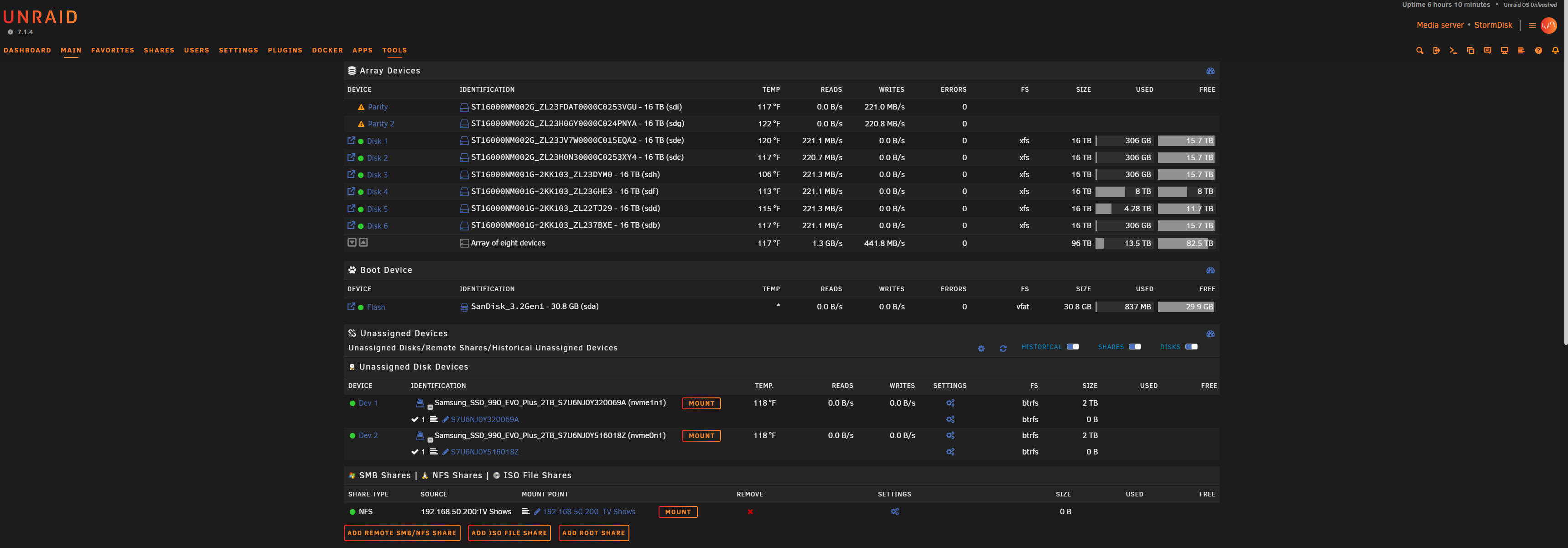
I am testing a Theory here in that putting (4) SAS HDDs on one port of the HBA and utilziing (2)x as Parity and the other (2) as Disk1 and Disk2 for the Array will solve the Write Performance issue. And so far, I’m getting the full 200+/MB sec that I was expecting for these SAS drives. The other (4) SATA HDDs, we’ll see.

1 Like

The difference is that the latter is using ‘turbo write’ while the original option is using standard. Turbo spins all disks for writes, so you’re able to get the full IO across all drives.

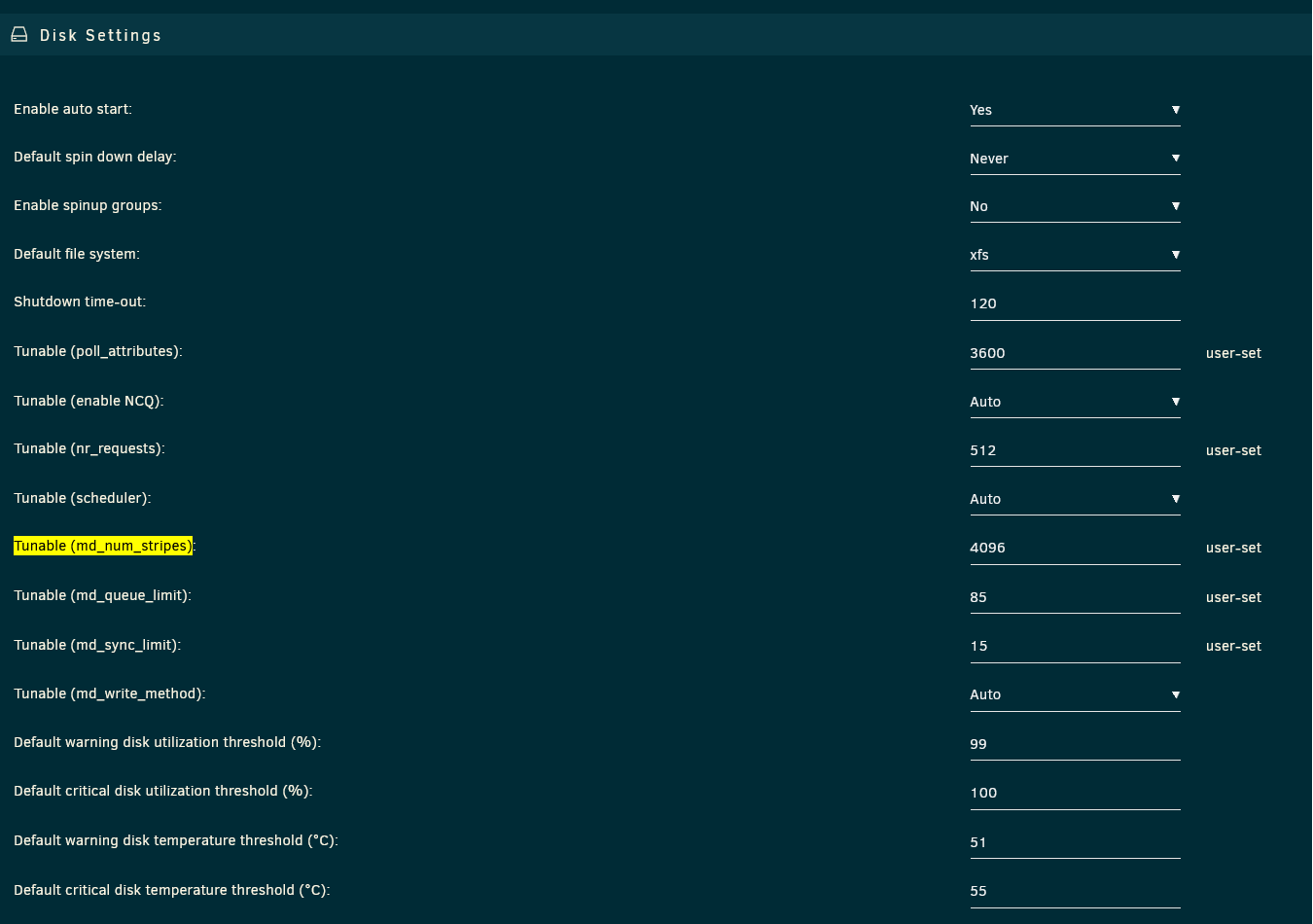
This is pretty typical performance for unraid, though you can tune it a bit as long as you’re willing to sacrifice some memory allocation (it’s not much tbh). Here’s mine:

Won’t get much better than that in my experience, and I’ve tested pretty extensively - YMMV of course!

1 Like

Unraid array disk performance is very slow, what i did was pass through the controller and drives to a TRUNAS VM running on Unraid host. I ran my drives in a 15 disk wide Z3 array. maxes out my 10Gb link.

You can thankfully get this kind of performance within unraid directly as well - just via CLI instead of UI, which I understand sorta defeats the purpose for many of course :sweat_smile: