Considering the HL15 Beast for a new server build (vs fractal 7 XL), but I’m missing some key dimensions and stats. And I haven’t seen any hands-on review videos of these yet.
I notice support for EATX motherboards, but what are the exact dimensions? Are SSI-EEB or XL-ATX motherboards (eg: TRX40 Designare) supported? And I would normally assume at least 8 pcie slots, but the photos I’ve seen only show 7?
What length power supplies are supported?
What length GPUs are supported? Has anyone run server grade fanless GPUs in these? (eg: A100s,with 40mm server fan ducts attached in back) How about multiple 3090s?
Any radiator mounting options?
Thanks!
45HomeLab did confirm mounting compatibility with SSI-EEB boards in the post below.
Thanks for the great questions. I do not have the answers to all of them, but I’m going to let you know so we can get these answered.
Below are the answers I do have for you
-
I notice support for EATX motherboards, but what are the exact dimensions? Are SSI-EEB or XL-ATX motherboards (eg, TRX40 Designare) supported?
- We have not tested these exact motherboards, but standard EATX will fit. (Corrected)
-
And I would normally assume at least 8 pcie slots, but the photos I’ve seen only show 7?
- This would depend on the motherboard you choose. Currently, the Beast has 2 motherboard options (ASROCK ROMED8-2T and Asus ProArt X870E-CREATOR WIFI)
- ASROCK ROMED8-2T has 7 PCIe slots
- Asus ProArt X870E-CREATOR WIFI has 3 PCIe slots
- You can also get the chassis only and put in your own motherboard if you need more than 7 pcie slots.
- This would depend on the motherboard you choose. Currently, the Beast has 2 motherboard options (ASROCK ROMED8-2T and Asus ProArt X870E-CREATOR WIFI)
-
What length power supplies are supported?
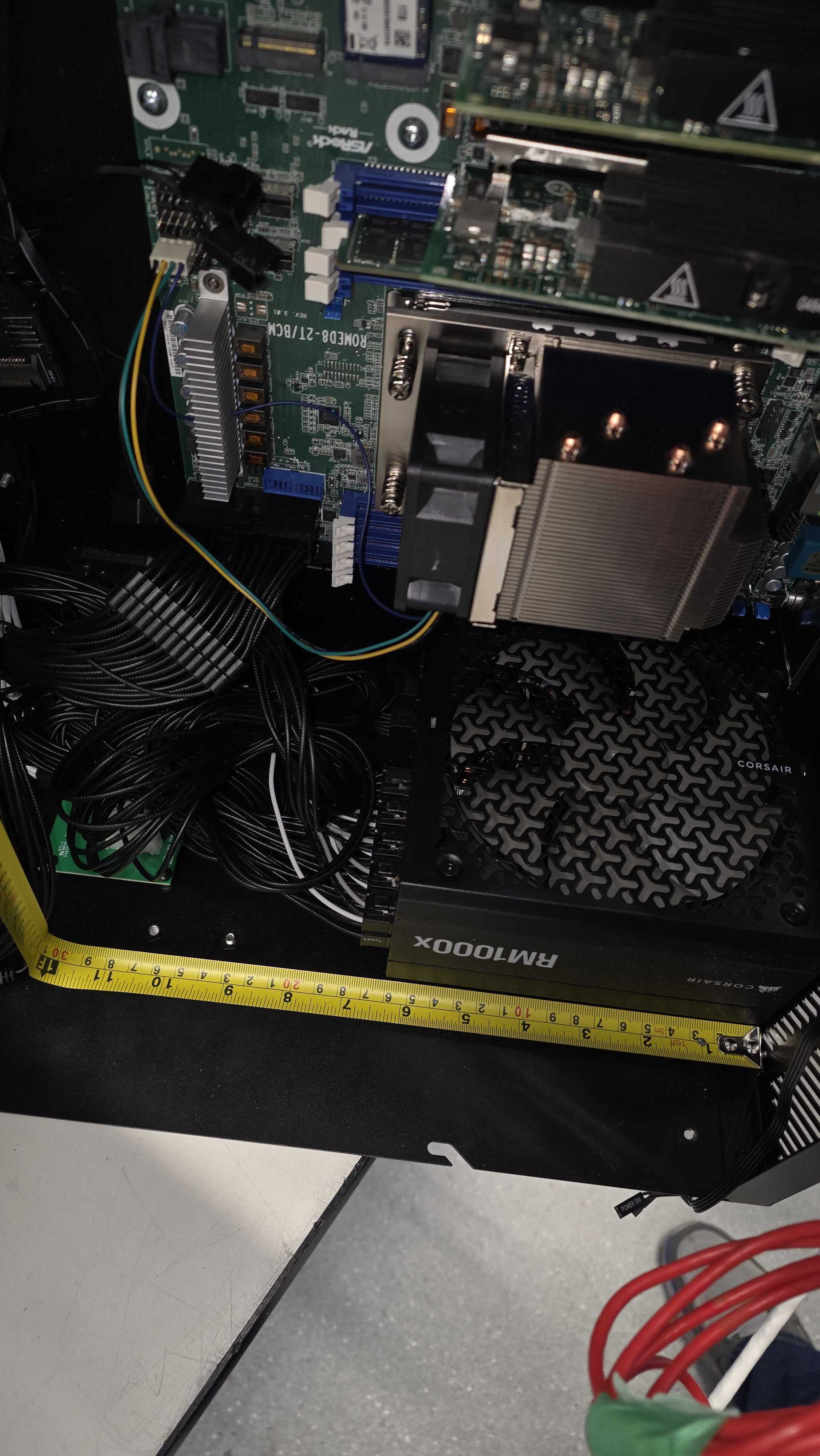
- It is designed around the Corsair RM1000x, which is 180mm in depth
- 10 inches would be the absolute max you would be able to fit before hitting the power distribution board
-
What length GPUs are supported?
-
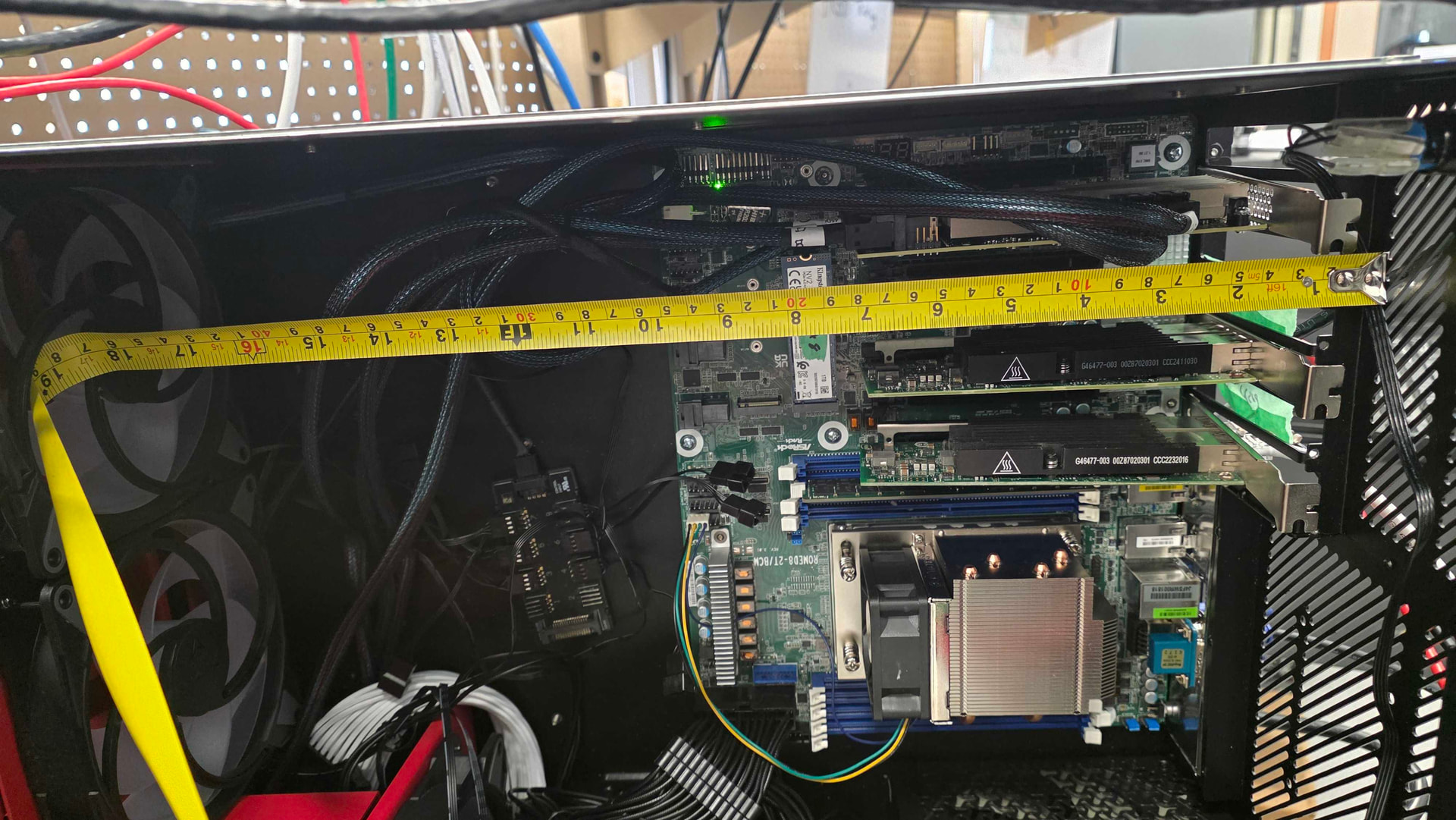
18 inches would be the max before you hit the fans
-
-
Has anyone run server-grade fanless GPUs in these? (e.g., A100S, with 40mm server fan ducts attached in back)
- Unsure, as we have not tested with these exact GPUs before
-
How about multiple 3090s?
- We have tested a wide range of GPUs in the Beast, and every card we tested fit without issues.
-
Any radiator mounting options?
- There are no official mounting options for radiators, but you could mount a radiator in place of the 2 140mm fans. Just note that this will decrease the room for a larger GPU
2 Likes
The TRX40 is 325 mm wide side-to-side, compared to ATX width of 305 mm. (Defining IO as “back”). I’m not sure 325mm will fit? Effectively it needs 8 slot’s worth of PCIe width and it uses slots 2 through 8. Also, even if it did, the question is how someone intends to use the edge-most slot. If they want to put a 2-slot wide GPU there then even if the board physically fit, the case has no space for overhanging GPUs.
I have installed an Asrock Rack ROME2D16-2T Motherboard in mine and it fits fine. Only issue I had was that one of the motherboard standoff points wasn’t there for the board. This can be easily rectified with a small 3 printed standoff and some glue or purchasing standoffs online.
Thanks, ive corrected my answer
Almost ready to pull the trigger, but was looking at using an SP5 EPYC motherboard instead, the SuperMicro H14SSL-NT. It’s SSI CEB so should fit, but I noticed the Beast only has 7 PCIe slots..and I’m not sure the 5 slots on the Supermicro would line up with them correctly? Does anyone have this combo? I’m certainly open to another motherboard option, but for what I need (5 slots for GPUs, + support for 24 SATA ports+12DIMM slots for max SP5 bandwidth, my options appear very limited?
H14SSL-NT | Motherboards | Products | Supermicro
I think that will fit just fine. If you are looking from the front of the Beast, the mobo slots will line up with the leftmost five case slot covers. It’s pretty common for modern boards with large CPU footprints, or coolers, to not use the rightmost ATX PCIe slot position, or in your case the rightmost two. You can confirm this a bit visually if you need to by comparing the screw holes in the middle of the board to an ATX diagram that shows the slots. Typically the screws line up with the rightmost of the seven slots.
One minor thing to note, which really is a bit more relevant to a regular HL15, is the leftmost slot sits under the power button, so on the 4U HL15 it can be a bit annoying to get a card set into that slot and it’s bracket screwed in.
Thanks. One other question I had, is, is there anyplace else I can mount an additional PCIe card? (connected via an MCIOx8–>PCIeX8). Is there space to do this horizontally above the PCIe area? There’s simply not enough slots otherwise. Also, since neither of the backplanes is trimode, how are people handling U.2 drives? Are there any STLs I can 3D print that would allow me to at least mount a pair of U.2 drives somwhere?
Thanks!
There aren’t any official solutions to you dilemmas.
For PCIe slots, one person did mount a card (a GPU in their case) above the PCIE area using DIN rails;
For U.2 drives, people have made a few versions of the 45HL SSD bracket that mounts to the inside backplate, but that can conflict with CPU tower coolers. There are any number of other 3D print examples floating around of cages to hold 15 mm drives that you could put along side the one for smaller 2.5" drives. I think Icy Dock makes some U.2 versions of their cages with backplanes. You just want to be sure you orient things so there’s still enough front-to-back airflow where it needs to go.
Thanks! Any chance we’d see a 3d printed bracket to mount an HBA or other 1 slot PCIe card horizontally in the chassis? either in the open space above the PCIe adapters, or the space above the power supply? That’s the one thing holding me back now..7 slots worth of cards (2x2 slot GPUs, 1x1 slot GPU, 1x1 slot NVMEx4M.2 and a 16i HBA…but only 5 usable slots in the case, since two are blocked by DIMMS on the Supermicro H14 motherboard..
1 Like
I’m not sure if that is on the roadmap, but I will be sure to bring this up to @Vikram-45HomeLab
1 Like