Just the error window doesn’t show anymore. My plugin shows my HHDs. My nvme have never been shown and not sure if the plugin is supposed to show them or not.
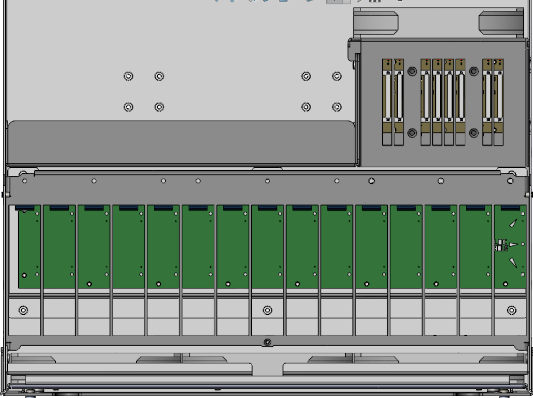
the plugin assests only have the chassis bays. Aside from the Stornados, I dont think any have NVMe support on backplanes/chassis. The beast has 2.5 SSD slots, and those are included in the plugin as they are part of chassis
HL-15
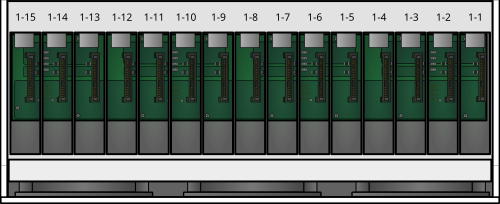
HL15 Beast
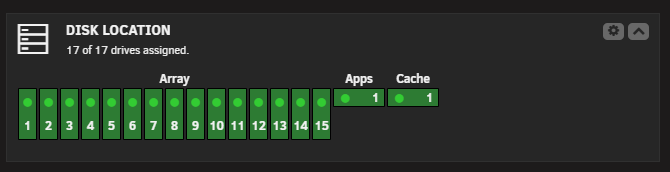
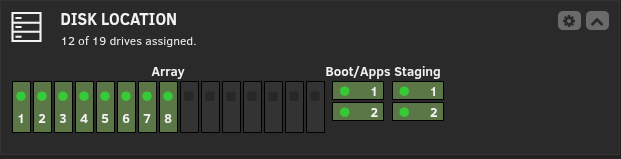
For unraid you also can use the “Disk Location” plugin for a dashboard widget to easily see health of of used slots. its configurable in a lot of ways and can have any kind of drives assigned, USB, NVMe, SATA, SAS
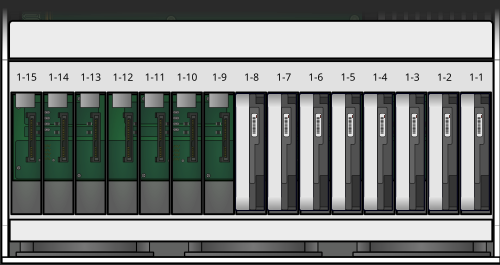
Here is my HL15 1.0 with the Apps and Cache being M.2 Gen4 NVMe
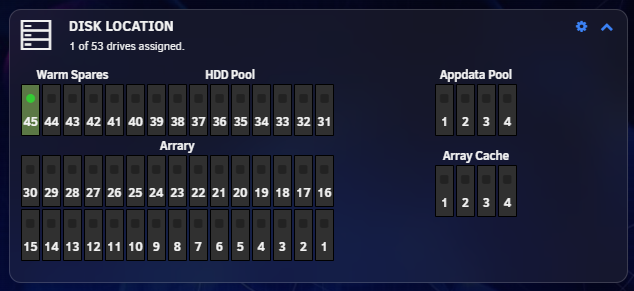
Here is what it looks like in my backblaze storinator i’m setting up for Offsite backup. The Apple and Cache are going to be 4x Gen5 NVMe M.2 on ASUS Hypercards in pools. Since unraid array only supports 30 drives, the 3 row of 15 bays is being configured for a ZFS HDD pool, then 5 drives for spares 3 for unraid (have to manually stop array and assign) and 2 for the HDD ZFS pool. Reason for so many spares is it will be remote and i won’t always be able to get to it right away.
1 Like
just noticed this also, The Beast pic, has SAS/SATA connectors on the 2.5" bays, but omitted them from the 3.5" bays 
Thanks for this. It definitely gives context on how it should look. I did discover the Disk Location plugin and love it. I was able to then update my plugin layout accordingly.
Hey all,
Our backplanes in the HL15 do not support NVMe drives; they only support SATA and SAS.
Only our newer enterprise servers support NVMe on our new trimode backplanes.
Hi @Hutch-45Drives,
Thanks for your input. I don’t think anyone in this thread is expecting the 45D Drive Map Plugin to work with NVMe drives. Though if you haven’t already, you and/or your team could help fix the ZFS bugs the plugin has by working with Simon F over on the GitHub Project page or by communicating with Simon F via DM on the Unraid Forums.
Though this thread has had some side conversations, the plugin that has 45Drives’ name associated with it does not work as expected. Simon F is committed to working through the issues, but it isn’t clear if he’s got the commitment and support of 45Drives in resolving the issues.
It’d be awesome if 45Drives showed some visible participation in resolving the issues with the plugin.
Not really, there was some progress, but issues still persist. I’m continuing to work with Simon to troubleshoot and resolve, but it feels like 45Drives is taking a hands-off approach.
Although I don’t know if Simon is from 45Drives, Unraid or just volunteering their time to make things for Unraid, Simon has been very communicative, which is appreciated.
Ya I been running a modified version of the plug-in on my hl-15 for a while now. SimonF is an amazing dev, also the one that wrote the gpustat plugin. He is making it just work for HL15 owners
1 Like
Not sure when after last update. My plugin on my x15 stopped working. Just shows a white window. Tried uninstalling it and re-installing to no avail.
I too encountered this and then the issue mysteriously went away. Please also report your experience in the issues portion of the GitHub project.
Github issue posted for 0.3.0 - x15 - Plugin only shows white window.
1 Like
A full reload in the browser i.e. ctrl + shift (Win) + r or cmd + shift +r (Mac) solved my problem.
For anyone who comes across this thread and is seeking the latest status of the 45D Drive Map plugin, it is actively being troubleshooted by its developer and those of us with HL-15 v1.0 systems.
If you’d like to participate in troubleshooting and have an HL-15 v1.0 system or HL Beast system, please refer to the Issues page of the GitHub project.
Here’s a direct link to the specific issue report on GitHub: HL15 1.0 Support · Issue #9 · unraid/45d-drivemap · GitHub
Hi everyone,
We are currently working with Simon Fair.
Thank you for your patience while we work through this matter.
1 Like
I think this is a bigger problem and absolutely not related to unraid install … I have a pre-built HL15 that is only about six months old and I get spewing garbage about Zpools when I open the drive map plugin as well for any disk that was not part of the original sata bays in the system (I have two NVME drive pcie bifurcation adapters that hold 4 drives each)
Hi @brainchill,
Thanks for your input. The issues you are encountering I believe has been reported in Issue #7 for the GitHub Project (ZFS pool warning · Issue #7 · unraid/45d-drivemap · GitHub) and a fix committed via Pull Request #11 (https://github.com/unraid/45d-drivemap/pull/11).
It may be helpful to provide details of your configuration and experience to Issue #7 in the GitHub Project so Simon Fair can connect with you if additional information is needed.
Hello!
So I found out about this: GitHub - unraid/45d-drivemap · GitHub
I thought it would be perfect for my HL4 running unRAID.
I installed it and ran into this:
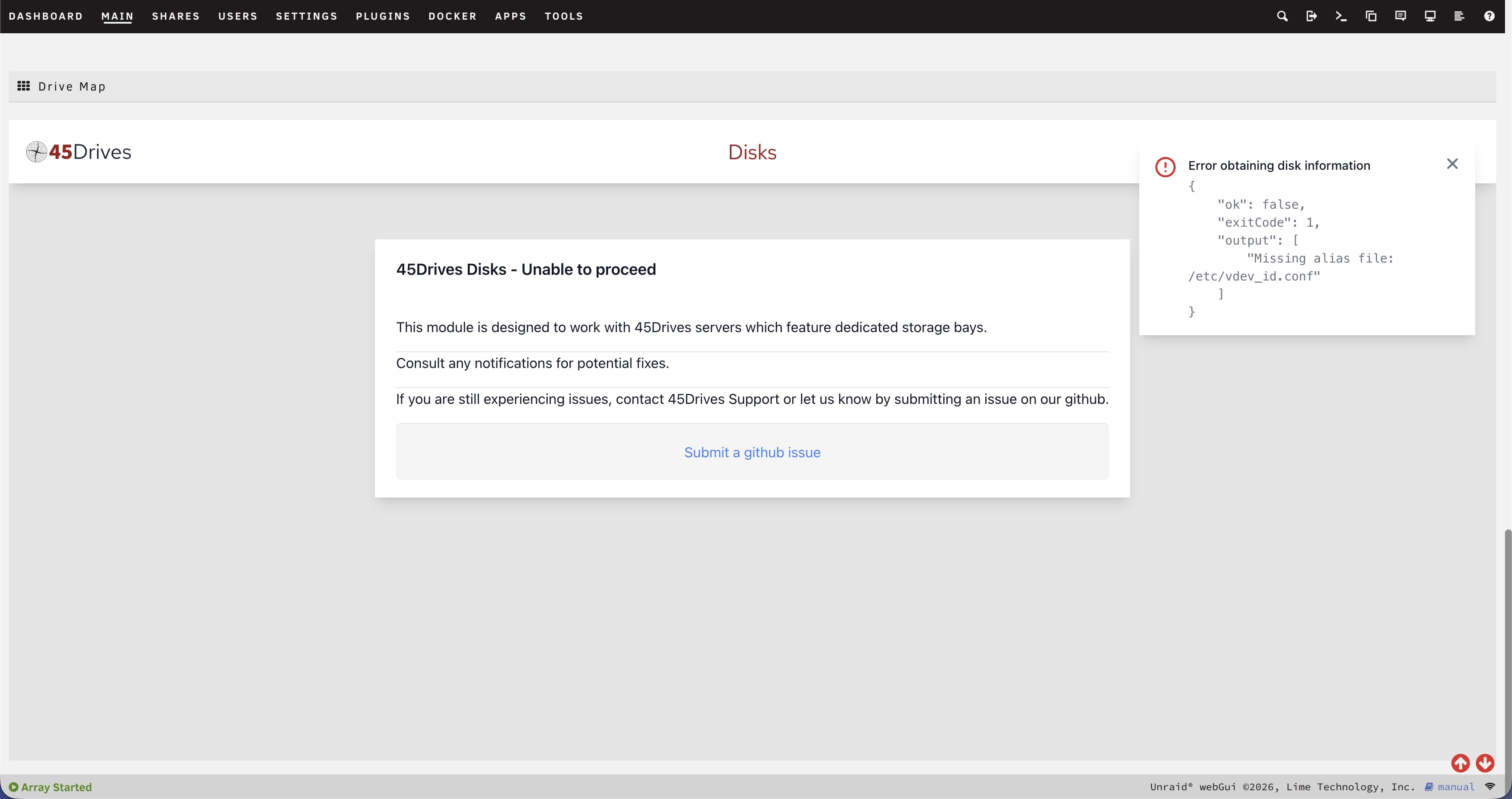
The HL4 is located here in the github link: 45d-drivemap/assets/45d/45drives-disks/img/chassis/hl4-homelab.png at main · unraid/45d-drivemap · GitHub

I have a full config HL4 that I bought a while back directly from 45Homelab.
Can I get some guidance on how to proceed?
This is an Unraid software plugin and is not directly managed or maintained by 45Drives.
If you encounter any issues or bugs, please report them through the Unraid GitHub repository so they can be reviewed by the appropriate development team.
Although we are not the maintainers of this plugin, we are working closely with the Unraid team behind the scenes to assist where we can and help ensure reported issues are resolved as quickly as possible.
If you require immediate assistance, please use the official Unraid support resources below:
-
Unraid Support: Unraid | Unraid Support: Forums, Docs & Direct Help
-
Unraid Community Forum: https://forums.unraid.net/
-
Unraid Documentation: https://docs.unraid.net/
I’ll report it there. Thanks for the guidance.